Showing posts with label Blogger. Show all posts

Thursday, 6 June 2013

How to Generate More Revenue from Ads on Your Website

If you want your website to pay for itself, or even generate a little extra income, you need to embrace the concept of online advertising. That’s right, websites that make money are those that accept online ads, typically in the form of pay per click (PPC) advertising. You can help make your website profitable by signing up for Google’s AdSense program. But not all website advertising is created equal; some sites generate a lot more ad revenue than others. In this article, Michael Miller, author of Using Google AdWords and AdSense, shares some tips you can use to increase your AdSense revenue — and make more money from your website.
If you want your website to pay for itself, or even generate a little extra income, you need to embrace the concept of online advertising. That’s right, websites that make money are those that accept online ads, typically in the form of pay per click (PPC) advertising.
PPC advertising works by placing context-sensitive ads on a web page. When a visitor clicks on an ad, the advertiser is charged a small amount for that click. The advertising network that serves the ad take a portion of that PPC payment, and the host website gets the rest.
The thing is, some sites generate a lot more advertising revenue than do others. It all comes down to how many clicks each ad receives; the more traffic a site has that clicks on its ads, the more revenue is generated.
How do you generate more revenue from your website ads? It all starts with signing up with a successful PPC ad network, and then doing anything it takes to increase the click-through rate.

A Brief Overview of Google AdSense

While there are several PPC ad networks out there, the most popular such network is Google AdSense. The AdSense program places content-targeted ads on your site, sells those ads to appropriate advertisers, monitors visitor click-throughs, tracks how much money is owed you, and then pays you what you've earned. All you have to do is sign up and reserve a place for those ads on your web pages.
AdSense PPC ads are typically smallish text ads (although an increasing amount are image ads), and you have full control over how many ads appear on each page, as well as the size and placement of each ad. You can make the ads as unobtrusive as you like—or make them stand out, the better to catch the attention of your site visitors.
It’s important to know that AdSense ads aren't just random advertisements; Google utilizes the same technology it uses to analyze web pages for its search index to determine the content of a page and place a content-appropriate ad on that page. For example, if your web page is about winter sports, it might place ads for ski equipment or ice skates on the page. The more targeted your web page, the easier it is for Google to find relevant ads that your visitors will find interesting.
In terms of managing the ads on your site, there’s little you need to do. Google automatically crawls each page on your site to determine its content, and places ads appropriately. Your only involvement is to activate the AdSense service and then insert the appropriate HTML code into each page. You then sit back and let Google do everything else. (You don't even have to notify Google if you change your site's content; AdSense automatically monitors your site for changes, and places new ads accordingly.)
If you haven’t yet signed up for Google AdSense, it’s free. Just go tohttp://www.google.com/adsense/ and create a new account. You can then what type of ads you want on your site; AdSense offers a variety of ad sizes, formats, and colors. Based on this information, AdSense will generate a block of HTML code specifically tailored for each page on your site. Copy this block of code and paste it into each web page where you want the ads to appear.
After the ads start displaying, sit back and wait for your site's visitors to start clicking. You monitor the performance of the ads on your site – and track revenues generated—via AdSense's control panel. You can also use the control panel to change the ads on your site or generate new ads.

Tuesday, 4 June 2013

Built Free Toolbar For Your Website Or Blog To Improve Visitor

earnblogtips.blogspot.inBuild a custom Toolbar for your website and keep updated your users with most important content. It is one of the most smartest way to building a strong community andgenerating traffic to your website or blogs. Allow your users to download the Toolbar form your site and see the magic.
        How to create a Toolbar for free?
Alexa.com is providing a free service to build a custom Toolbar for your website or blog.Here you can build your own Toolbar easily in some easy steps.

>Signup for an account or login directly using your Facebook account.
>Click the ''create one button''
>Accept terms and conditions.
>Set up your custom Toolbar.
>Get link of your Toolbar page and paste into your website or blog.
Set up your Toolbar.
After accepting terms & conditions you will redirected to set up page.
Alexa toolbar
1-First pick a name of your Toolbar. It is good to giving your site name.
2-Link Button: Put here the most important link of your site that your users can access it instantly.
3-Menu Button: You can put multiple links of your website, which you want to share with your users by menu button. It is a drop down menu.
4-Search Button: Here two options are available. You may allow your users to search content in your website using search engine or your own search URL.
5-RSS Button: Put here your rss feed URL to allow users to subscribe your feed directly form your Toolbar.
6-Facebook page Button: Paste your Facebook page URL to make people to like you.
7-Twitter Button: Paste your Twitter URL to make your users to follow you.
8-Gmail Button:  Your users can view new email notification form here.
9-Toolbar control button: This is a icon, Toolbar may controlled by this button( show or hide).
Next add your logo and valuable description of your Toolbar. This description will shown in your Toolbar page.
earnblogtips.blogspot.in
Adding the Toolbar in your site:
After clicking publish button, you can see the promotional button code of your Toolbar right bellow of Toolbar statistic.Choose your perfect promotional button and copy the code and paste into right place of your website or blogs.

earnblogtips.blogspot.in
That's all....

Still you have any problems to create please post  a comment.

Add Your Blog Or Website To Alexa Ranking Fast

Claim Your Blog on Alexa

Below are some steps which you have to perform to submit your website in alexa.

1- Visit Alexa.com and create an account.

2- Now log in to your account. If you don't want to create new account then you can also log in with your

facebook account.


3- Now go to alexa site owner page.


4- Now enter your blog/website domain name and click on Claim Your Site button as shown in below screenshot.


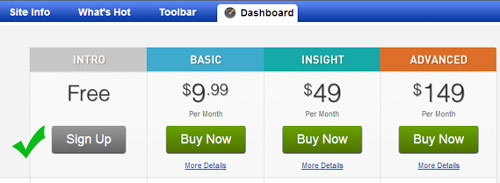
5- On the next page you will get all the plans and prices that alexa offers. As being a blogger I recommend you to choose Free plan. Click on Sign Up button under "Free Plan".


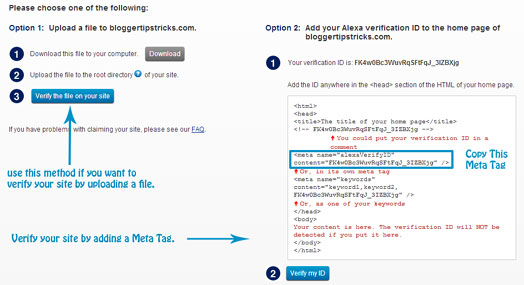
6- Once you click on sign up button, on the next page you will see two verification options.


7- add a meta tag in your blog template under <head> section.

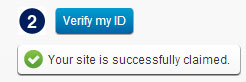
8- After adding meta tag in your blog, go back to alexa and click on "Verify my ID" button.

9- If everything is right, you will receive a confirmation message like below picture.


10-Click on continue to add your site details. Fill all the details like your site title and description, alexa rank in country and fill your public contact information.

11- You Are Done

Final Words!

This was all about how to claim site / blog on alexa. If you want to improve your alexa ranking then submit you site in alexa today. Please leave your valuable feedback and comments about this tutorial. Thanks! Peace :)

Add Your Website Or Blog To Yahoo Search engine

Yahoo! - Site Explorer allows you to explore all the web pages indexed by Yahoo Search Engine.  It also improves your pages Visibility on yahoo search results.  It will give an idea about the most popular pages from your site.  By submitting a Site Map or feed URL, You can find pages that link to your site and out linked from your Site.  It is Similar to Yahoo Webmaster Tools
Add a Site or Blog to Yahoo! - Site Explorer:
1-Sign in to Yahoo! using your existing Yahoo! ID details or Sign up for new account.
2. Now open Yahoo! - Site Explorer   and enter your Site or Blog URL in appeared box. Then click Add My Site.
Yahoo_Guide_1

3. You have to authenticate your site.  For this,    you go for 2nd procedure   By adding a META tag to my home page.  Copy the Meta tag and add a backslash ' / ' before  ' > '.   Don't close this page.   Have a look on Screen shot.
Yahoo_guide_2
Don't forget to add slash, Otherwise it shows XML error.
Example Tag:  <META name="y_key" content="ebc9d2f7530798e8"/>
4. Now open Blogger Dashboard in your blogger account --->> Next click your blog Design  option --->> then click  Edit HTML.
5.  Find <head> tag and Paste Meta Tag just below it.  Click Save Template.
Yahoo_Guide_3
6. Now come to Yahoo! - Site Explorer and click Ready to Authenticate.
Add a Site feed or Site map to Yahoo! - Site Explorer:
7. In Yahoo! - Site Explorer, open Feeds under your site and enter your feed URL path as rss.xml. For better understanding, see screen-shot guide. Now click on Add Feed
Yahoo_Guide_4
8. You have done it. Effects don't appear in one day. It takes several days to get good results.

Top 10 Blogger Templates


Download Best Free Premium Blogger Templates for 2013

So I decided to share some great templates with you which were recently released this year from different designers. These templates are very awesome in design, SEO friendly and have some beautiful features which can easily be customized.
I have 10 beautiful blogger templates for you and you can download all of them from this page. These templates are magazine type, news type and especially for technology blogs. So have a great look at them and download them for your blogs :).

How to Download These Templates?

All the downloading and DEMO links are given below each template's example image, so if you want to check the demo of any template then just click the LIVE DEMO and for downloading the template click the download link. Also below the template list there is a video in Urdu which will guide you how to install any blogger template in seconds.

#1. Metro Simple Blogger Template

I would just say that this template is great. This template was recently created and has all features which a professional design must have. The most beautiful template I can say, this one is. It has all what you need.

#2. Inspiration Dawn Blogger Template

I really like simple and professional blogger templates and this one is of course a simple and professional template. It Has a look similar like labnol.com and you can however customize any part of this template according to your needs. Photos Gallery, two cute menus including drop down and a big header is the beauty of this template.

#3. Devil's Workshop Blogger Template

This template is the one which I'm using myself on this blog for last few months and the result is great yet. Especially it is SEO optimized and easy to customize. I will keep it on my blog for a long time. It has all necessary features.

#4. MONOP Blogger Template 

This template is totally a fresh and clean one. The template is created by a professional web designer and SEO opmitzer Muhammad Mustafa Ahmedzai of MBT. this template has space for Google adsense ads and also a beautiful red colored drop down menu. The header is also cool, and has a default subscription box for Facebook, Twitter and email subscribers. So grab this template by clicking the downloading link below the picture.

#5. Halifax Blogger Template

This template is very awesome in design and Layout. I just liked its header and simple navigation bar. It can attract people who like quiet environment while reading a blog.

#6. Mash 2 Blogger Template

Mash 2 is the second copy of Mashable blogger template in 2012. So it is also a great template in design, menus, layout and with other widgets. This template can also be used in 2013 for blogging.

#7. Freshable Blogger Template

This is another beautiful template for personal blogs and has a very unique navigation menu at header. The space for logo is also a new one. This template has many other features and a cute side bar. Must give it a try in 2013. This template is created by Faizan Ali of MBL who is also a silent reader of this blog. He blogs terribly.

#8. Quintel Blogger Template

Quintel blogger template is also released in the middle of 2012 and it is similarly likeWay2blogging template. It has a navigation menu along with a header and can be customized easily.

#9. Balena Blogger Template

Balena is WordPress converted blogger template which is the best for Cooking blogs and other domestic blogs. Girls and women can use it for their blogs and it has a colorful environment. 

#10. Style Vantage Green Blogger Template

This is another simple and awesome blogger template and this template is useful for poetry and SMS blogs. However, it can be used for any kind of blog, because it has a navigation bar as well as a simple header and two columns.

Why we say these templates are for 2013?

Because we have checked most of these templates and they are perfect for 2013 year. These templates were mostly released in the middle or in the end of 2012, therefore, they have overall capabilities for 2013 as well. You can freely use them in 2013 for your blogging with blogger.com.

How to Install a blogger template?

I most of you know about installing a blogger template, but if any of you don't know then here is a video tutorial in Urdu language which will show you a practical stage of installing a blogger template in seconds. Do watch it and learn the procedure of template installation.

Do you need the best collection of blogger templates for 2013 year which is coming after a month? if so then this post is specially published for you. As we know finding the best, clean and fresh templates for blogger blogs is the hardest and never ending job. But if you  find a great free template then what do you need more?. From the day since I'm using blogger.comfor blogging, I search mostly for clean and well-coded free templates which are also SEO optimized by default and user friendly in design. However, I have never tried to create a unique template for my blog myself. But now, the time has come and Inshallah very soon I'll be releasing an absolutely new template from http://itstemplateblog.blogspot.com/

Download Best Free Premium Blogger Templates for 2013

So I decided to share some great templates with you which were recently released this year from different designers. These templates are very awesome in design, SEO friendly and have some beautiful features which can easily be customized.
I have 10 beautiful blogger templates for you and you can download all of them from this page. These templates are magazine type, news type and especially for technology blogs. So have a great look at them and download them for your blogs :).

How to Download These Templates?

All the downloading and DEMO links are given below each template's example image, so if you want to check the demo of any template then just click the LIVE DEMO and for downloading the template click the download link. Also below the template list there is a video in Urdu which will guide you how to install any blogger template in seconds.

#1. Metro Simple Blogger Template

I would just say that this template is great. This template was recently created and has all features which a professional design must have. The most beautiful template I can say, this one is. It has all what you need.

#2. Inspiration Dawn Blogger Template

I really like simple and professional blogger templates and this one is of course a simple and professional template. It Has a look similar like labnol.com and you can however customize any part of this template according to your needs. Photos Gallery, two cute menus including drop down and a big header is the beauty of this template.

#3. Devil's Workshop Blogger Template

This template is the one which I'm using myself on this blog for last few months and the result is great yet. Especially it is SEO optimized and easy to customize. I will keep it on my blog for a long time. It has all necessary features.

#4. MONOP Blogger Template 

This template is totally a fresh and clean one. The template is created by a professional web designer and SEO opmitzer Muhammad Mustafa Ahmedzai of MBT. this template has space for Google adsense ads and also a beautiful red colored drop down menu. The header is also cool, and has a default subscription box for Facebook, Twitter and email subscribers. So grab this template by clicking the downloading link below the picture.

#5. Halifax Blogger Template

This template is very awesome in design and Layout. I just liked its header and simple navigation bar. It can attract people who like quiet environment while reading a blog.

#6. Mash 2 Blogger Template

Mash 2 is the second copy of Mashable blogger template in 2012. So it is also a great template in design, menus, layout and with other widgets. This template can also be used in 2013 for blogging.

#7. Freshable Blogger Template

This is another beautiful template for personal blogs and has a very unique navigation menu at header. The space for logo is also a new one. This template has many other features and a cute side bar. Must give it a try in 2013. This template is created by Faizan Ali of MBL who is also a silent reader of this blog. He blogs terribly.

#8. Quintel Blogger Template

Quintel blogger template is also released in the middle of 2012 and it is similarly likeWay2blogging template. It has a navigation menu along with a header and can be customized easily.

#9. Balena Blogger Template

Balena is WordPress converted blogger template which is the best for Cooking blogs and other domestic blogs. Girls and women can use it for their blogs and it has a colorful environment. 

#10. Style Vantage Green Blogger Template

This is another simple and awesome blogger template and this template is useful for poetry and SMS blogs. However, it can be used for any kind of blog, because it has a navigation bar as well as a simple header and two columns.

Why we say these templates are for 2013?

Because we have checked most of these templates and they are perfect for 2013 year. These templates were mostly released in the middle or in the end of 2012, therefore, they have overall capabilities for 2013 as well. You can freely use them in 2013 for your blogging with blogger.com.

How to Install a blogger template?

I most of you know about installing a blogger template, but if any of you don't know then here is a video tutorial in Urdu language which will show you a practical stage of installing a blogger template in seconds. Do watch it and learn the procedure of template installation.

Approve your google adsense account-Mastertricks

Approve your google adsense account-Mastertricks

-
Approve your Google Adsense EasilyEvery Blogs or website Owner Main Dream to launching website is making money from their. So in the Internet world Google Adsense is one of best Leading Advertising Company. Making Money from internet is hard but not impossible thing. Google is provide Advertising service for publisher for blog and website Owner. Every People Know that Google Adsense is best reputed Ad network which offers best CPC based ad but your aim about making money from online is devastated Because Google has very strict approval Rules and this is understandable reason it may like to reduce dummy, fake accounts and also prevent frauds click. So If you want to success in Making Money online from internet you must genuine way to approve you account. 

Here I Providing a few, quick and fast way to learn how No. 1 Company Google Adsense approve you....below are step for blog and web owner must follow...
Before Apply Check whether your website banned by google or not 


 How to Get Approve Google Adsense 100% Master tricks

What is Url of your website ?

Apply google adsense from Top Level Domain
 Every Person expected to visit a Top Level Domain(.com,.org, .co.uk etc) Rather then sub Domain. Becuase Sub domain like .co.cc, .tk, .wordpress.com, .blospot.com etc are not good for adsense because mostly they used by more often by spammer. So first thing in your mind that if you want to approve your adsense account from google you must have own Top Level Domain Like .com, .org. 

Check your site's quality rather then quantity

Write Original and unique article for Google Adsense
 
First thing ask in your mind before apply google adsense, what is your site quality rather then quantity. Your site have must original and unique 40-50 content before apply. and go to your traffic logs and find that how many visitor are coming from No. 1 search engine google because you are applying adsense and it's a google company.

 Design your website 

good webdesign make a adsense approve
Every Person always read that first impression is the last impression so Create a Simple and clear design rather then Choosing dark style. So if you have a not more knowledge about professional Design give it this job to web designer because A professional looking site has more chance of getting successful google adsense account. 

Some Fundamental Idea about professional design are as under

  • Easy Navigation stylish menu-submenu
  • Interruption-Free colorf- Use Hex code generator
  • Easy reach Search box
  • Link importance pages like Contact us, about us, Archives, sitemap, Privacy page etc.
  • Social Networking Site button
  • Link you Google+ Profile Page to site 
  • Put your name and write something about yourself so google adsense verify your site easily.


Read and follow Tearms & Conditions

that's a last step to do Before applying adsense you must read all the publisher terms and conditions from here. Most of your problem related to adsense are posted directly and indirectly here. 

Apply for Adsense

After doing all above tricks by presenting me (Mastermind) for creating successful adsense account apply for adsense. When your apply make sure you fill each and every details carefully and correctly Because Most of cases your even small mistake can get you adsense account disapproved. So read and write twice your details like address, phone number, pin code number etc.) So check your all fill details before final apply of google adsense.
After apply you must follow Terms and condition I here give you all terms and condition in sorted format just follow that adsense policies before banned 

http://www.myblogtips.org/2012/10/tips-to-follow-for-not-get-disable-or.html
all above idea and trick are suggest you to get 100% success in online money making ideas from your website through Google Adsense.